AI Agent Workspace vs. Control Plane: What Do You Need After the Demo?
Compare persistent workspaces, execution environments, and agent control planes, then choose the ownership, proof, and recovery model your workflow needs.

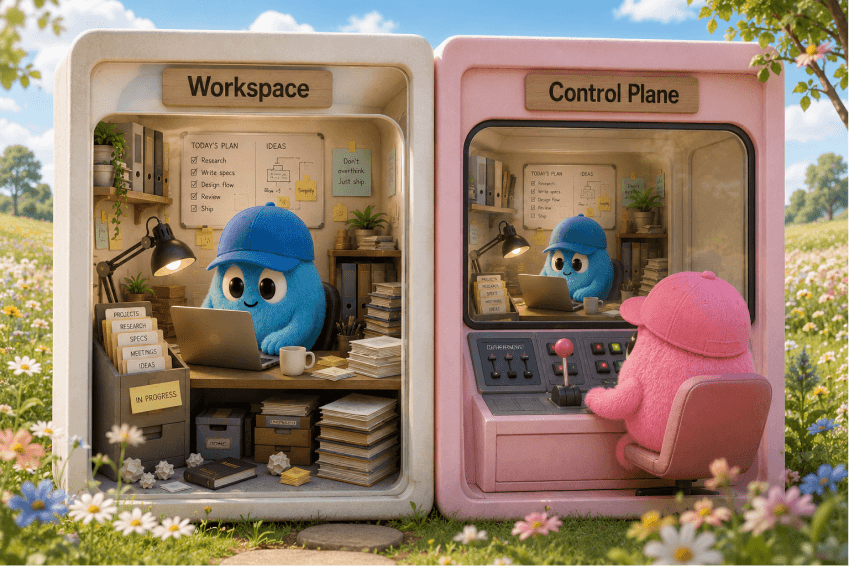
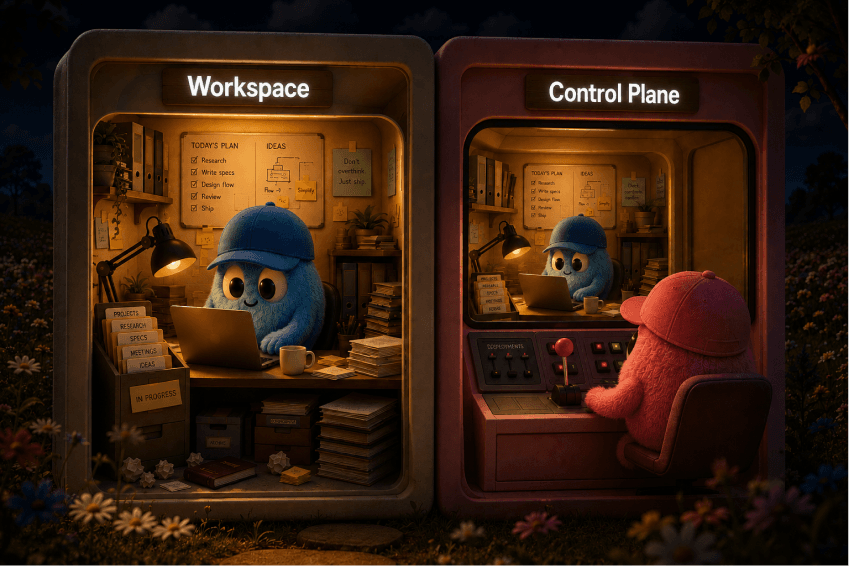
An AI agent workspace is the persistent operating environment where task state, context, files, permissions, schedules, and outputs remain available. An agent control plane provides capabilities to observe, govern, and intervene, while an execution environment gives agents somewhere to act. One product may combine all three jobs; the distinction is about capabilities, not vendor categories.
The real test comes after the demo: what remains running, reviewable, owned, and recoverable after the builder closes the laptop or leaves the account?
That gap doesn't show up in a fifteen-minute demo. It shows up in week three, when the builder isn't in the room.
TL;DR
- Workspace, execution environment, and control plane are three different jobs. One product can cover one, two, or all three, so compare capabilities, not labels.
- Persistence and "it runs in the cloud" prove almost nothing alone. What matters is what survives a restart and who owns it.
- The agent's own "done" message is a claim, not proof. Verify consequential work at the destination system itself.
- After the demo, name four owners (business, workflow, system, incident) and confirm a non-builder can run and recover the workflow.
- Match the tool to the risk: one-off work needs execution, recurring work needs durable state, unattended work needs state plus real intervention.
What is an AI agent workspace?
An AI agent workspace is a persistent environment that keeps selected task state, context, files, permissions, schedules, outputs, and history available across sessions, not just while one chat tab or process stays open.
A transcript proves nothing by itself, nor does "it runs in the cloud." The narrower question: what survives a restart, and who's responsible for it?
Cloudflare's reference architecture for an enterprise AI agent workspace describes a workspace authority that owns conversations, tasks, schedules, consent decisions, and an event queue, with outputs that outlive the conversation and webhooks that start work without an open browser.
On April 22, 2026, OpenAI announced workspace agents in ChatGPT: cloud-based, Codex-powered agents with a workspace of files, code, tools, and memory that keep running while the user is away, on schedules, inside ChatGPT or Slack. OpenAI's own page describes this as a research preview for ChatGPT Business, Enterprise, Edu, and Teachers. One vendor's current example, not a universal blueprint.
Persistent does / does not prove:
| Persistent proves | Persistent does not prove |
|---|---|
| Selected state, files, or outputs survive a restart or closed tab | The state is complete, correct, or reconciled against reality |
| Schedules or webhooks can trigger work without a person present | Anyone has reviewed what the schedule produced |
| History exists to inspect later | The history is owned by someone who will act on it |
What does an agent control plane do?
An agent control plane gives people or policy the ability to observe, govern, and intervene in agent work: registry, identity, lifecycle, telemetry, audit, and approvals.
None of that tells you whether the underlying work has a durable home. A control plane can sit on stateful or stateless work.
Microsoft Agent 365 fits this positioning: a control plane for observing, governing, and securing agents, with a registry, analytics, lifecycle policies, audit/security controls, and handling for ownerless agents. IBM's explainer broadens the definition to include execution and state/memory management. "Control plane" isn't shorthand for "dashboard only." Galileo describes its open-source Agent Control, announced March 11, 2026, as a control plane for centralized runtime governance.
A working control plane checklist:
- Observe: see what's running and what it touched
- Govern: apply policy before and during execution
- Approve: require sign-off at defined checkpoints
- Intervene: pause, stop, or redirect a live run
- Audit: produce a record after the fact
Workspace, execution, or control: which does what?
Workspace, execution, and control are three operational jobs, not three exclusive vendor categories. A single product can supply one, two, or all three.
Sorting vendors into rigid buckets is the fastest way to misjudge a stack; ask what capability is implemented, by which layer.
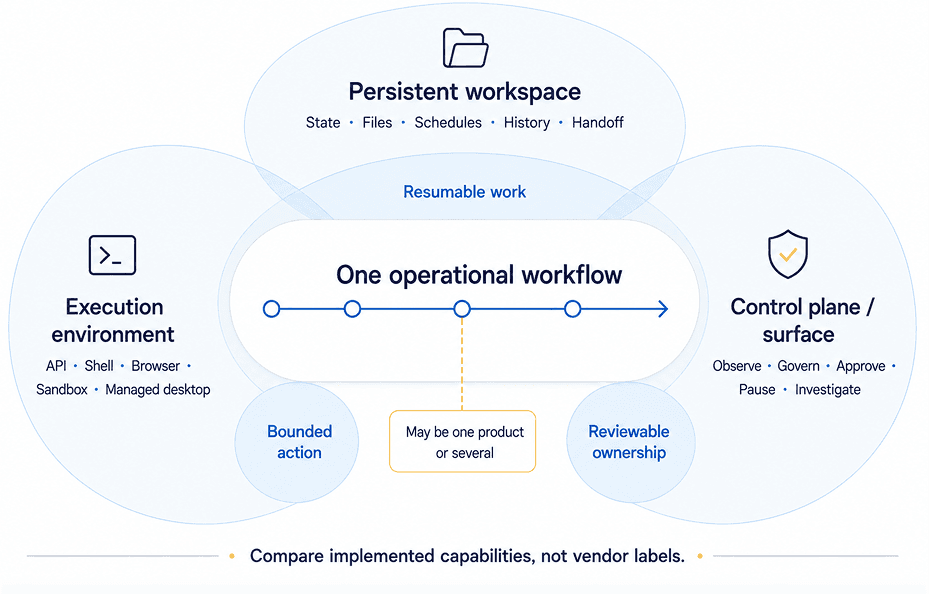
| Operational job | Capabilities | What it proves | What it does not prove | Questions to ask |
|---|---|---|---|---|
| Persistent workspace | State, files, schedules, history, handoff material | Context and outputs survive across sessions | Correctness or that anyone reviews the output | What persists, and who can read or export it? |
| Execution environment | API, shell, browser, sandbox, or managed desktop | The agent has somewhere to act | Durable state or governance over the action | Where does it run, and what happens if interrupted? |
| Control plane / surface | Observe, govern, approve, pause, audit | People or policy can see and intervene | A durable home or verified output | Can a non-builder pause this safely, with an audit trail? |
AWS WorkSpaces for AI agents shows how one product can combine managed desktop execution with observation and intervention controls. Its page describes agents operating enterprise apps through MCP, view-only observation, pause/stop intervention, CloudTrail tool-call logs, CloudWatch session metrics, and S3 screenshots. Evaluate any additional workspace or persistence requirements separately.
How do you hand off AI agents after the demo?
Managing agents after the demo means mapping authoritative state, then assigning four named owner roles so the workflow survives a change of operator.
For every piece of state this workflow touches (files, credentials, schedules, approvals), ask where the real answer lives. "Wherever the agent last wrote it" is a gap.
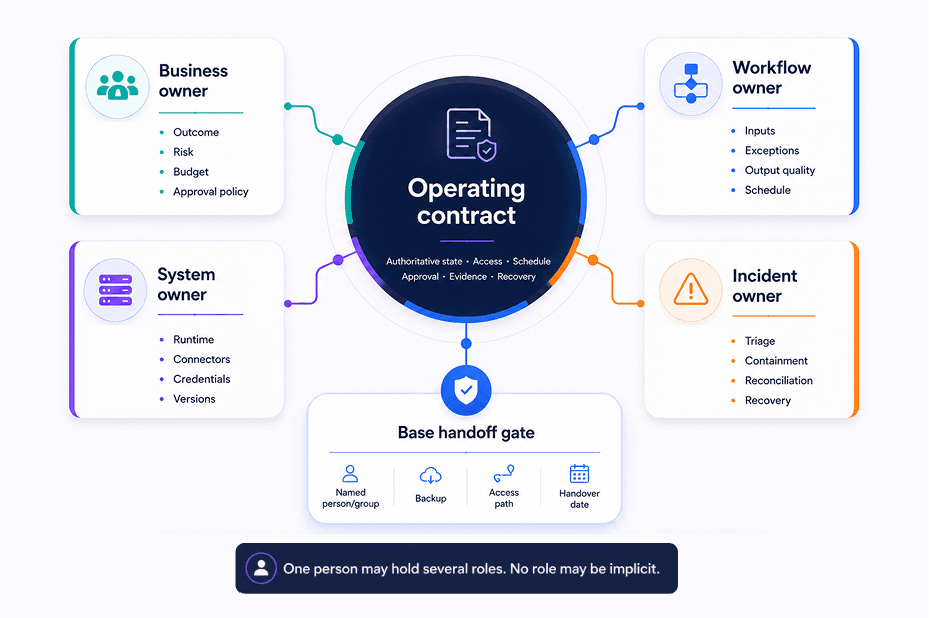
Four owner roles for the operating contract:
| Role | Responsible for |
|---|---|
| Business owner | Outcome, risk tolerance, budget, approval policy |
| Workflow owner | Inputs, exceptions, output quality, schedule |
| System owner | Runtime, connectors, credentials, versions |
| Incident owner | Triage, containment, reconciliation, recovery |
One person may hold several roles, but no role should be implicit. This is an article-created framework, not a standard body's taxonomy. NIST's AI RMF Playbook makes an adjacent point in general risk-management terms (defined roles, review, inventories, decommissioning, recovery), useful background, not a source for this split.
Before calling a handoff done, run this checklist:
- Access moves to client-controlled accounts where appropriate, not the builder's personal login.
- Credentials have a documented revocation and rotation path.
- Schedules are owned and visible to someone who isn't the builder.
- Data and outputs are exportable, not trapped in one interface.
- Approval boundaries are written down, not remembered.
- A non-builder can run and recover the workflow without calling the consultant.
That's the real test. If who maintains the agent after handoff is still open three weeks in, the handoff didn't happen. It was a demo with a longer runway.
What proves an AI agent finished the work?
An agent's own "done" message is a claim, not proof. Completion has to be verified against the destination system that holds the result.
Treat every consequential task as a seven-link chain. Trust almost always breaks right after execution, before anyone checks the destination.
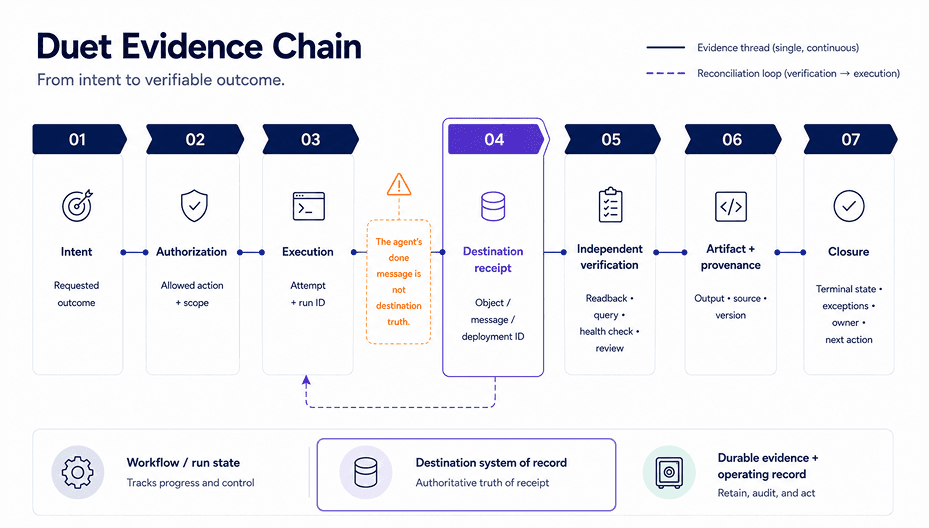
The seven-step evidence chain:
- Intent: the outcome that was actually requested
- Authorization: the allowed action and its scope
- Execution: the attempt, with a run ID
- Destination receipt: an object, message, or deployment ID from the target system
- Independent verification: a readback, query, health check, or review
- Artifact and provenance: the output plus its source and version
- Closure: terminal state, exceptions, owner, and next action
The critical transition is step 3 to step 4: the agent's own success message is never destination truth. Kubernetes' controller documentation illustrates the underlying principle, reconciling actual state toward desired state, though that page was last modified September 1, 2024, so treat it as background, not fresh evidence.
Hypothetical destination checks, by task type:
| Task | "Done" claim | Actual proof |
|---|---|---|
| Email send | Agent reports message sent | Provider delivery receipt and a lookup in Sent items |
| CRM update | Agent reports record updated | The CRM record itself, queried independently |
| Deployment | Agent reports build succeeded | A deployment ID plus a live smoke test against the running service |
| Report | Agent reports report generated | A dated report tied to its source inputs, opened and checked |
The systems vary; the pattern doesn't.
How do you recover a failed agent workflow?
Recover in a fixed sequence: STOP, SCOPE, RECONCILE, RESUME, PROVE, LEARN, so you never retry a step that already landed.
"Run it again" is often the costliest available mistake: a duplicate email or a double-charged invoice can beat the original failure.
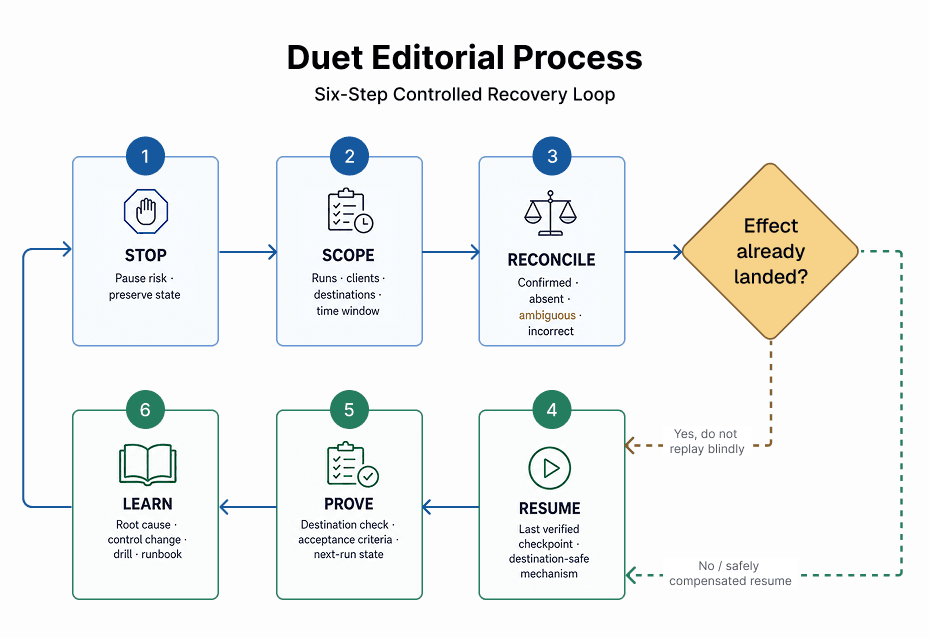
- STOP: pause the workflow and preserve current state.
- SCOPE: identify which runs, clients, destinations, and time window were affected.
- RECONCILE: for each item, determine whether the destination effect is confirmed, absent, ambiguous, or incorrect, before any retry.
- RESUME: restart only from the last verified checkpoint, using a destination-appropriate idempotency key, dedup rule, lookup, upsert, or compensating action.
- PROVE: check the destination directly against acceptance criteria.
- LEARN: document root cause, fix the control that let it happen, and update the runbook.
Temporal's documentation describes durable workflow state that persists through failures and resumes from where it left off, useful for step 4. For the retry mechanism, Stripe's idempotent request documentation is concrete and vendor-specific: a matching-key retry returns the saved result, while mismatched parameters error. Other destinations need their own dedup or upsert logic.
At least once is not exactly once. Most agent action paths guarantee a step was attempted at least once, not that it happened exactly once. Reconcile before you resume.
What should you review in month three?
Month three is when a workflow's operating condition shows up, not demo quality, but schedule health, access hygiene, and output correctness.
The builder has usually moved on by now; assume it.
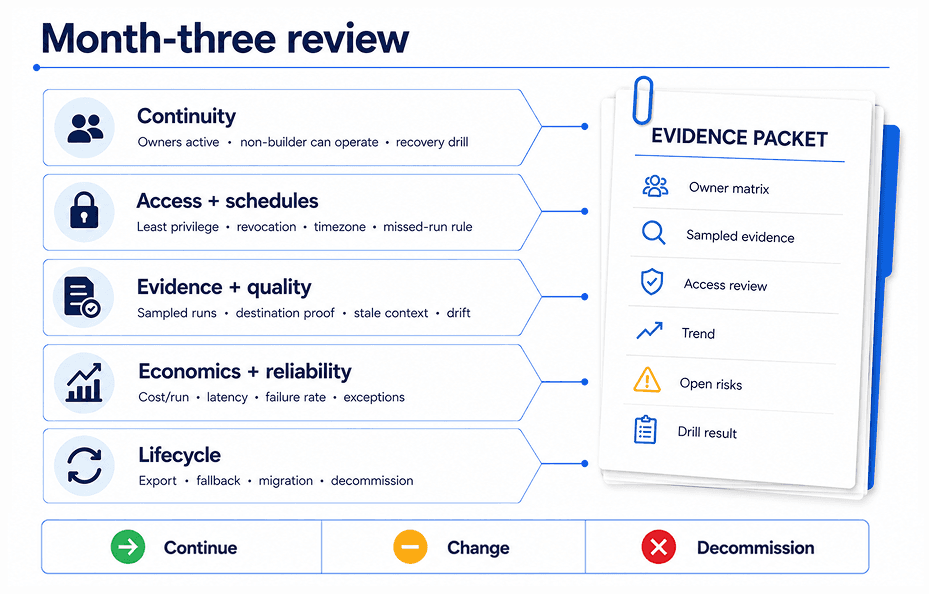
| Question | Evidence to inspect | Owner | Action if it fails |
|---|---|---|---|
| Is the schedule still firing as intended? | Run history, missed-run alerts | System owner | Fix trigger or reassign ownership |
| Are connectors and credentials still healthy and least-privilege? | Access review, credential age | System owner | Rotate, narrow scope, or revoke |
| Is context stale? | Sampled inputs vs. current reality | Workflow owner | Refresh source data or retire the run |
| Is output actually correct at the destination? | Sampled destination checks | Workflow owner | Add verification step or pause |
| Are exceptions being resolved or piling up? | Exception queue | Incident owner | Triage backlog; adjust thresholds |
| Is cost or latency per run reasonable? | Verified workflow records, not benchmarks | Business owner | Re-scope task or renegotiate approach |
| Can someone recover this without the original builder? | A recovery drill, run live | Incident owner | Rebuild the runbook; retrain |
| Is this workflow still worth running? | All of the above | Business owner | Continue, change, or decommission |
This is also where AI workflows for agencies matter for the consultant persona: the client relationship survives on a non-builder passing this review without a support call. Failing one check isn't a failed project. It's a decision for the owner.
When do you need a workspace, a control plane, or both?
Match the requirement to the consequence: a bounded one-off task needs mostly execution; recurring work needs durable state; unattended work needs state plus real intervention.
| Workflow pattern | Workspace job | Execution job | Control job | Minimum proof before use |
|---|---|---|---|---|
| One-off, supervised | Optional / bounded record | Required | Basic inspect + stop | A visible result you check yourself |
| Recurring team or client work | Durable state, artifacts, handoff material | Required | Approvals + inspection | Destination evidence plus a named owner |
| Consequential, unattended | Durable state, checkpoints, ownership | Bounded, recoverable. See where to host AI agents | Policy, intervention, audit | Reconciliation plus a recovery drill |
Real products land differently here. OpenAI describes its workspace agents as combining persistence and scheduled execution. The cited pages emphasize different jobs, and products may overlap: Microsoft Agent 365 centers on control-plane capabilities; AWS WorkSpaces centers on managed execution plus observation controls. None ranks above the others. The row above decides what you need, not the vendor's category.
Which tool builds the agent is a separate decision. See the roundup of AI agent builders if that's still open.
The useful Duet question is not "Does it replace every control plane?" It doesn't need to. Duet publishes its own agent-drive positioning, and that page is worth reading closely against the checklist above rather than taking it on faith. Read Duet's agent-drive page and check what it actually says: does it describe authoritative state, an execution boundary, approval controls, completion evidence, a named credential owner, a recovery checkpoint, and an export path, and does it frame each of those as shipped, in preview, or as direction? That question matters most to a consultant trying to leave behind more than a demo, with a recurring workflow, an owner, and a handoff path attached. Treat Duet the same way you'd treat any vendor named in this guide: one candidate to run through the matrix above, not a default answer, and not a substitute for checking these seven items yourself once you've picked a tool.
Next action, in three steps:
- Write down which row above describes your actual workflow, not the demo version.
- Name the four owners before the first production run.
- Schedule the month-three review now, on a calendar.
Once the operating model is settled, build an AI command center covers the practical setup. This article is about deciding what you need first.
The bottom line
The demo is never the test. What decides whether an agent workflow survives is quieter than a polished walkthrough: does its state have a durable home, does someone own it by name, can you prove the work actually landed at the destination, and can a non-builder recover it when it breaks. Settle those four first, then match tools to the matrix above, not the other way around.
If you want that durable home to be one place instead of five scattered tabs and logins, Duet is worth running through the exact checklist you'd hold any vendor to: authoritative state, an execution boundary, approval controls, completion evidence, a named owner, a recovery checkpoint, and an export path. Name your four owners, put the month-three review on a calendar, and if Duet clears the checklist, give your agents a workspace that outlasts the demo.
Frequently asked questions
What is an AI agent workspace?
An AI agent workspace is a persistent environment where selected task state, context, files, permissions, schedules, outputs, and history remain available across sessions. It may also include execution and control capabilities, but the name alone doesn't prove them.
What is the difference between an AI agent workspace and an agent control plane?
A workspace primarily gives work durable state and artifacts. A control plane provides governance, visibility, and intervention. One product may combine both, so compare implemented capabilities, not vendor labels.
Do you need both a workspace and a control plane?
Not always. A low-risk supervised task needs only execution and basic controls. Recurring or consequential work usually needs durable state plus a way to approve, pause, and recover it, whether one product or several supplies those jobs.
How do you manage AI agents after handing them to a client?
Document authoritative systems, schedules, permissions, approval rules, completion evidence, and four roles: business, workflow, system, incident owner. Then have a non-builder run and recover the workflow without calling the consultant.
Can an AI agent keep working when your laptop is closed?
Yes, if execution and triggers run elsewhere. But laptop-independent execution alone does not prove durable state, correct outputs, safe retry, or client ownership. Verify what survives a restart and how the destination is reconciled.
What evidence proves an AI agent finished a task?
Use destination-linked proof: a sent-message receipt and lookup, the updated CRM record, a deployment ID plus live smoke test, or a dated report tied to source inputs. The agent's own "done" message is only a claim.